LEARNING OBJECTIVES
- Critically analyze media to determine the credibility of the media sources and trustworthiness of the content
- Describe a media filter bubble and its effect on people and society
- Develop strategies to identify and counteract the effects of filter bubbles
- Metacognitively evaluate their own media literacy skills
GAME REQUIREMENTS
- Classroom with computer, projector, and screen
- Prior to class, divide students into two sides (Pro and Anti – do not tell students that there are two sides) and divide each side into teams of 2-4 (3 recommended)
Make a copy of this document to create the teams:
https://docs.google.com/document/d/1CKmgXAZv2w0hid8jUFsNgNgmEvP2YkiY5PVk08nhwDg/copy - Separate tables for each team
SETUP
For Teacher
- Prepare an email (or other messaging) draft:
- Subject line: “Escape the Echoes”
- Body: https://escapetheechoes.com/cast-your-vote-721/
- To: (yourself)
- BCC: All students on the Pro side
- Prepare an email (or other messaging) draft:
- Subject line: “Escape the Echoes”
- Body: https://escapetheechoes.com/cast-your-vote-722/
- To: (yourself)
- BCC: All students on the Anti side
- Setting up the Menti voting platform:
- Join the Mentimeter team, “Escape the Echoes” using this link: https://www.mentimeter.com/app/join/6de27fc842dabc69cf7060f3
(Note: After you verify your email, you will see a pop-up message asking if you would like to join the Escape The Echoes workspace. Make sure to click “Accept.”) - Select the “Nuclear Power Plant Vote” presentation and click the three dots on the right hand side. Duplicate the presentation.
- Click on the three dots next to the duplicated presentation and click ‘Move to my presentations”
- Go to your presentations and click on the title of the newly duplicated presentation. Delete the “copy (1)” at the end.
- Go into the presentation and click share at the top right. Next to access code expiration at the bottom of the share window, change “2 days” to “14 days”
- Write down the Menti join code to share with students.
- Join the Mentimeter team, “Escape the Echoes” using this link:
- Join the Mentimeter team, “Escape the Echoes” using this link: https://www.mentimeter.com/app/join/6de27fc842dabc69cf7060f3
- Gather small objects, such as tokens, coins, or pieces of paper, that can be used as Hint Tokens. Each team will received 3 Hint Tokens to use during the entire game.
- Prior to having the students play, go through the game yourself starting either at the Pro or Anti side (links below)
For Students
- Computer, tablet, or mobile phone (computer recommended).
GAMEPLAY
- Teacher distributes 3 Hint Tokens to each team
- Teacher sends both emails and notifies students to check their email
- Make sure students do not click on the link until the teacher says “Start!”
- Teacher projects timer on the board (45 minutes)
- Teacher says “Start!” and begins the timer.
Starting Pages
| Pro Side | Anti Side |
| Start page (sent to Pro side teams): https://escapetheechoes.com/cast-your-vote-721/ | Start page (sent Anti side teams): https://escapetheechoes.com/cast-your-vote-722/ |
During The Investigations
- Teams proceed through the three investigations
- Teacher can monitor progress and announce the remaining time
- Teams can request a hint on any puzzle by giving the Teacher a Hint Token
- Hints and solutions to all of the puzzles are on this document (do not share with students): https://docs.google.com/document/d/1IfOdeoGh8ZXEtvABC5L8VZIyl0_N05vIQU4j7iZEg08/edit?usp=sharing
After The Investigations
- When each team completes the final (third) investigation, they need to provide the final code (“835”) to the teacher
- If the code is correct, the teacher provides the team the Mentimeter join code and directs them to mentimeter.com.
POST-GAME
- After all teams are finished with voting on the Menti, project the Menti results on the projection screen
- Have a discussion and reflection session.
DISCUSSION QUESTIONS
- Why do you think there were different opinions on this issue?
- What is a media filter bubble?
Show this video: https://www.youtube.com/watch?v=1z2kiU13Axc - What filter bubble was your team in? Did it occur to you that you were in a filter bubble?
- How did you get into that filter bubble?
- What are some real life examples of filter bubbles?
- What filter bubble might you be in right now?
- What effect could filter bubbles have on a person or society?
- How do media literacy skills expertise help you recognize filter bubbles?
- What can you do to stay aware of filter bubbles?
- How can you help others stay aware of filter bubbles?
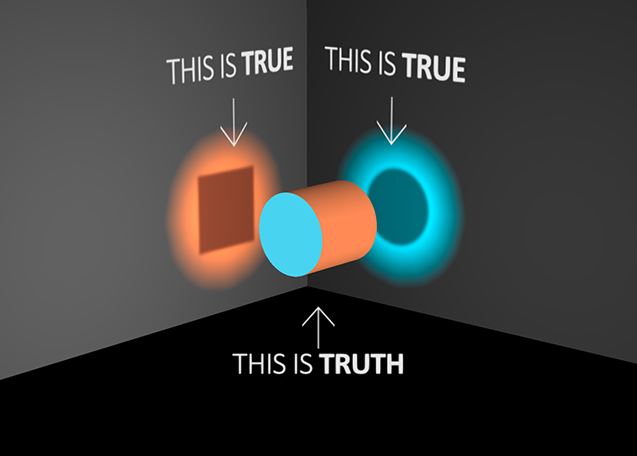
Discuss this image
POST-GAME SURVEY
- Send the link to the post-game survey to all students. The survey is strictly anonymous and the data will only be used as research and to help us improve the game.
- Post-game survey: https://forms.gle/pqgJpZ67eFjLtz6Y6
- If you would like a copy of the survey results, please contact us.